
A Bizarre Run Controls: Horse Keys, Boost and Hang
Learn A Bizarre Run controls for riding, items, and combat, resolve the F vs. Z boost conflict, and see what is confirmed about Hang.
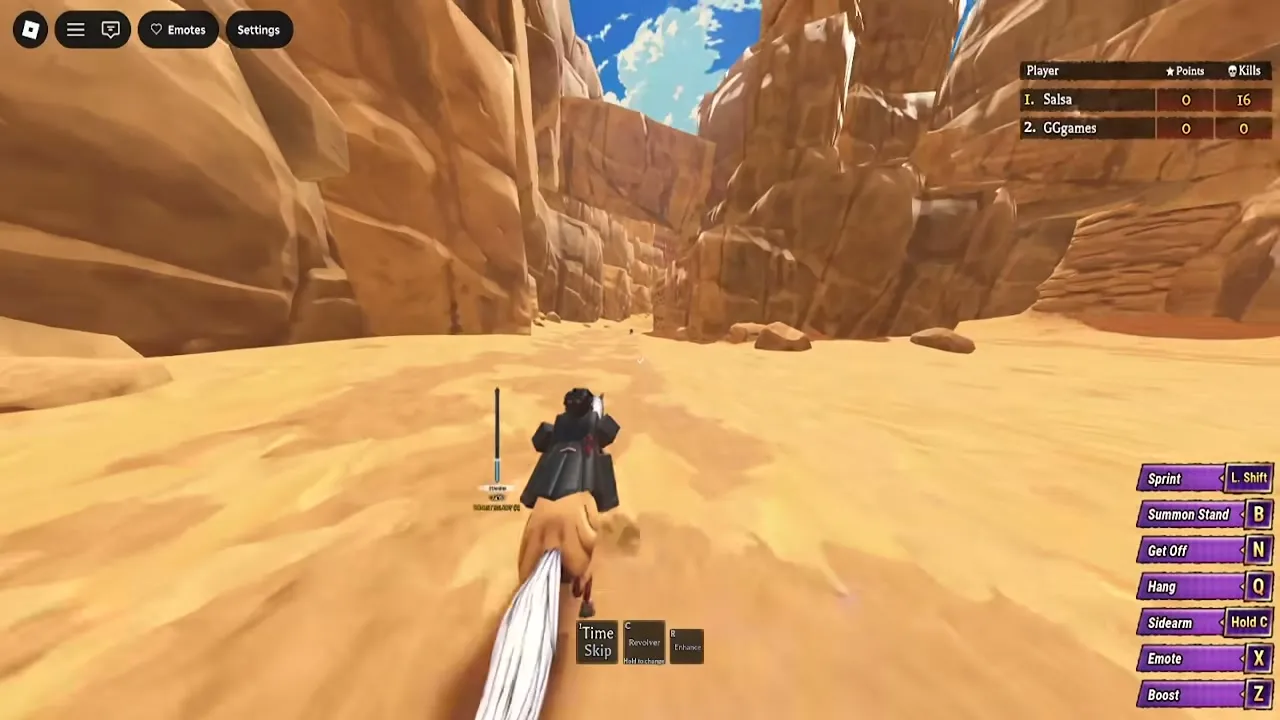
Which A Bizarre Run controls are officially listed?
A Bizarre Run controls can be confusing when the race tutorial says Z for boost but the game description lists F. Checking that difference before a close finish helps you avoid pressing a key that does something else in your current mode. This guide separates the official keyboard list from community reports and explains which actions still need clarification.
General game reference: this recording provides context, not a dedicated demonstration or proof of every topic discussed here.
The video is narrated in Portuguese. The English explanation in this article covers the relevant observations.

GUIA COMPLETO do A BIZARRE RUN (STANDS, ESTÁGIOS, NPCS e ETC.) - Roblox — GG Games
View the source recording on YouTube.
The reference point is the November 9, 2026 snapshot of the official A Bizarre Run Roblox listing, labeled [D4C]. Its description supplies the following keyboard bindings. These are confirmed as published instructions; the boost entry conflicts with launch gameplay evidence.
| Action | Officially listed input | Context or limitation |
|---|---|---|
| Run on your horse | Shift | Specifically described as a mounted action |
| Call your horse | T | Listed for recovering your horse after falling off |
| One-time boost | F | Conflicts with the Z prompt in launch footage |
| Equip a secondary item | Tap C | Draws your secondary item |
| Choose a secondary item | Hold C | Selects which secondary item to use |
| Bring out your Stand | B | Summons your equipped Stand |
| Emote | X | Activates an emote |
| Jump | Space | Listed as the jump input |
Use the binding shown on your current in-game HUD when it disagrees with a written guide. Check it while performing the relevant activity: mounted racing, fighting on foot, or interacting in the lobby.
For basic movement, community reports list W, A, S, and D. That movement mapping comes from the beginner guide rather than the official description’s shorter control list.
Why do A Bizarre Run controls show F and Z for boost?
The linked sources disagree, and they do not explain why. The official description assigns the one-time boost to F. Player experience in launch footage includes a tutorial instruction to press Z, while community reports also identify Z as the mounted boost key.
The same community control list assigns F to blocking during combat. That makes context especially important: memorizing one function for every key can leave you expecting the wrong action after dismounting.
| Action and source context | Reported key | How to interpret it |
|---|---|---|
| Boost in the official description | F | Published instruction with a documented conflict |
| Mounted boost in launch player experience | Z | Follow Z if your mounted HUD displays it |
| Block in community combat reports | F | Check the combat interface before relying on it |
There is not enough evidence to call this a confirmed remapping, a particular patch change, or two interchangeable boost shortcuts. F and Z should not be presented as universally valid boost keys at the same time.
Before spending your boost, identify both the displayed input and whether the action is available. The official wording describes a one-time boost, while player experience in the Spin showcase shows it available again in Stage 2 after being used in Stage 1. That observation does not establish a universal recharge timer.
The showcase also provides a useful timing example: the player saves the Stage 2 boost for the closing stretch and overtakes opponents near the finish. Treat that as player experience demonstrating a strategy, rather than a guaranteed winning sequence. Your route, remaining stamina, and nearby hazards still require attention.
What does Hang do in A Bizarre Run?
Hang is identified as a mounted action bound to Q in launch gameplay evidence and community reports. Its exact mechanical benefit is unconfirmed in the reviewed sources.
That distinction matters because a button label alone does not establish what happens to incoming damage. The sources do not verify invulnerability, damage reduction, projectile avoidance, or a specific protection window. They also do not establish whether Hang requires a tap or a hold.
Community reports assign Q to Dash when fighting on foot, so the key’s reported function changes with your character’s state. Check that you are mounted and that the HUD actually labels Q as Hang before testing it.
A practical way to approach the action is to:
- Read its mounted HUD label before a dangerous section.
- Observe the action in a quieter stretch of the course.
- Avoid building a survival strategy around an unverified defensive effect.
The sources separately identify N as Dismount while riding. Do not confuse that action with Hang. Community reports also list N for context-sensitive interactions, making the nearby prompt important once you are off your mount.
For now, a useful answer to “what does Hang do?” stops at the confirmed mounted action. A detailed explanation of its defensive mechanics would require evidence beyond the linked sources.
How do secondary items and combat controls work?
The item side of A Bizarre Run controls starts with the difference between tapping C and holding C. The official listing distinguishes drawing a secondary item from choosing one. If the item you equip is not the one you wanted, check your selection before treating the input as broken.
Combat introduces another set of contextual bindings. The following table summarizes community reports from the Sportskeeda beginner guide’s controls section. These entries supplement the official list and should be checked against your current combat HUD.
| Combat or interaction action | Community-reported input | What to check |
|---|---|---|
| Basic attacks, often called M1s | Left mouse button | Whether combat is available |
| Dash | Q | Your on-foot action label |
| Block | F | The combat binding, given the boost conflict |
| Skills | Number keys 1–4 | Your equipped moveset |
| Additional skill input | C | Whether the HUD shows an item or ability action |
| Empower move | R | The special action for your equipped ability |
| Context-sensitive interaction | N | The nearby interaction prompt |
| Shift Lock | Left Ctrl | The binding shown in your session |
The C entry needs particular care. The official description uses C for secondary items, while the community list also includes it among skill inputs. Read the displayed action for your equipped setup instead of assuming C always triggers the same attack.
Player experience with Spin illustrates why this matters. In the linked showcase, steel balls replace the revolver, while other secondary items, including dynamite, remain selectable. The player also demonstrates charging a steel ball and watching a charge meter. That establishes charging for the demonstrated weapon, without establishing a universal charge command for every item.
Spin is also described in player experience as an innate fighting style that does not need the same Stand activation routine. Pressing B is therefore not a universal first step for every ability setup.
Finally, race rules can explain an apparently unresponsive attack. Player experience in the complete guide describes direct combat as disabled during Stage 1, although players can trigger environmental traps. Stage 2 enables fighting. Drawing a weapon and being allowed to damage another racer are separate things.
How should you practice and troubleshoot these controls?
Practice A Bizarre Run controls in two short sessions: riding first, then fighting. This keeps the changing functions of Q, F, N, and C easier to recognize.
During the riding session, start with movement, Shift, and Space. Community reports identify Left Shift for sprinting, and player experience shows the need to manage stamina rather than sprint continuously without watching the meter. Learn how your horse responds before adding item selection and boost timing.
Next, practice following another racer. The tutorial described in player experience explains that sprinting behind an opponent can produce a slipstream boost. That is a separate racing mechanic from pressing the dedicated boost key. The reviewed sources do not establish an exact following distance or activation threshold.
For combat practice, the official listing identifies a separate Battlegrounds mode. Player experience in GG Games’ complete guide describes using it to try a Stand and fight other players. It offers a place to learn your moveset without simultaneously concentrating on the race route.
A useful practice order is:
- Read the active HUD. Identify the keys for the activity you are doing.
- Learn recovery. Remember T as the officially listed horse-call input after falling.
- Select your item deliberately. Separate holding C to choose from tapping C to draw.
- Check your combat actions. Locate basic attacks, dash, block, and equipped skills.
- Add race timing. Practice slipstreaming and decide where an available boost would help.
When something does not work, compare the symptom with the source-supported distinctions below.
| What you notice | Relevant distinction | What to check next |
|---|---|---|
| The expected boost key does nothing | Official F conflicts with launch Z | Read the mounted boost label and availability |
| Q does not perform the expected action | Community reports distinguish Hang from Dash | Check whether you are mounted or on foot |
| C brings out the wrong item | Choosing and drawing use different C inputs | Check the selected secondary item |
| Attacks do not damage racers in Stage 1 | Player experience describes direct combat as disabled | Distinguish stage restrictions from an input problem |
Calling your horse also deserves a precise expectation. The official instruction says T calls it after a fall; it does not establish that the same press automatically remounts you. Watch what the game displays after calling.
These checks help identify mismatched expectations, but they do not prove the cause of every failure. The linked player experience includes gameplay bugs, and the sources provide no complete troubleshooting procedure. If your HUD and observed behavior disagree, record the action, mode, and displayed binding before reporting the issue.
A Bizarre Run controls FAQ
Should I press F or Z to boost?
The official listing says F, while launch player experience and community reports show Z for mounted boost. Follow the binding on your current race HUD. The reviewed sources do not explain the discrepancy or confirm that both keys work.
Does Hang make you invincible?
That is unconfirmed. The evidence identifies Hang as a mounted Q action but does not establish invulnerability, damage reduction, or reliable protection against attacks. Avoid treating it as a guaranteed escape from damage until its effect is documented.
How do I call my horse after falling off?
Press T, according to the official keyboard list. This is the horse-call action. Community reports identify N as the mounted dismount key, so calling your horse and getting off it are different commands.
Are A Bizarre Run controls confirmed for controllers and touchscreens?
The official Roblox game description supplies keyboard instructions. The provided evidence does not establish a complete controller layout, touchscreen layout, or support for every Roblox device. A community video mentions checking settings for console awakening but supplies no exact button. Check any device-specific prompts and settings available in your session.
Related Articles
guide
A Bizarre Run Battlegrounds: Beginner Combat Guide
Learn A Bizarre Run Battlegrounds basics, compare beginner Stands, check combat controls, and practice M1 combos with clear source-backed advice.
guide
A Bizarre Run Beginner Guide: Controls, Stands and Your First Race
Learn A Bizarre Run controls, race stages, Stand acquisition, and smart reward spending, with official facts and community tips clearly separated.
guide
A Bizarre Run Falling Through the Map: Fix Status and Recovery
Check the reported Mr. President fix, understand under-map incidents, and learn what to do if a fall interrupts your A Bizarre Run race.
Was this helpful?
Thanks for the feedback!