
A Bizarre Run Battlegrounds: Beginner Combat Guide
Learn A Bizarre Run Battlegrounds basics, compare beginner Stands, check combat controls, and practice M1 combos with clear source-backed advice.
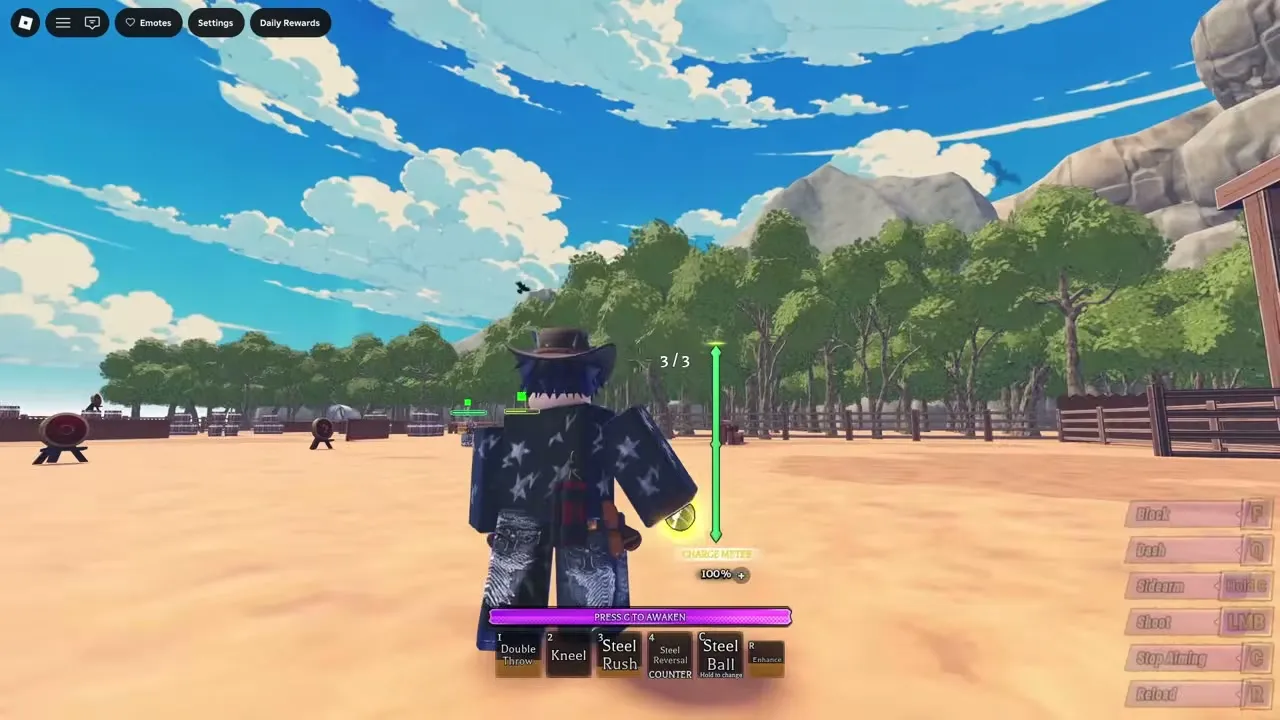
How do you start playing A Bizarre Run Battlegrounds?
Your first fight becomes easier to understand when you can tell which attack connected and why your next move missed. This guide helps you practice basic attacks, movement, and skill follow-ups with a clear purpose. Keep this guide handy when checking controls, because racing and on-foot combat use different actions.
General game reference: this recording provides context, not a dedicated demonstration or proof of every topic discussed here.

WINNING WITH SPIN AND HOW TO GET & UPDATE ADDITIONS.. | A Bizarre Run — JustVision
View the source recording on YouTube.
The official A Bizarre Run Roblox listing confirms a public Roblox experience featuring horse racing and a separate fighting mode. This guide uses the November 9, 2026 snapshot of the global release’s D4C listing.
Community reports describe Battlegrounds as a free-roam, free-for-all area accessible from the lobby. Players use it to try Stands and fight other players. That makes it a useful place to focus on combat without also following a race route.
| Activity | What the reviewed sources establishes | Beginner takeaway |
|---|---|---|
| Battlegrounds | Separate fighting mode; community reports describe open PvP | Use it to learn your available moveset |
| Horse racing | Officially supported alongside Battlegrounds | Keep racing controls and objectives separate |
| Stage two combat | Launch player experience shows fighting during races | Race encounters provide examples, but do not establish arena rules |
The first goal in this guide is straightforward: enter Battlegrounds, inspect the Stand choices available to you, and check your controls.
The reviewed sources do not establish ranked tiers, skill-based matchmaking, or a dedicated beginner queue. Treat your opening fights as opportunities to identify one useful improvement, such as recognizing an attack’s range or remembering your defensive input.
Which combat controls should you check first?
Start with the controls you need during an exchange. The official listing documents several general and racing inputs, while Sportskeeda’s beginner controls guide provides a more detailed community-reported combat layout.
The distinction matters because the sources disagree on some inputs. Use the table as a keyboard checklist, then confirm the bindings shown in your current game.
| Action | Supplied input | Evidence and context |
|---|---|---|
| Bring out your Stand | B | Official listing |
| Jump | Space | Official listing |
| Basic attacks, commonly called M1s | Left mouse button | Community-reported combat control |
| Dash | Q | Community-reported combat control |
| Block | F | Community-reported combat control |
| Skills | Number keys 1–4 | Community-reported combat controls |
| Empower move | R | Community-reported combat control |
| Secondary item | C; hold C to choose | Official listing; check availability in your mode |
Pay particular attention to F. The official description assigns F to a one-time racing boost, while the community controls article assigns it to blocking during combat. Older footage also shows Z for boost. These references should not be combined into one universal control scheme.
C needs similar care. The community article includes it among skill inputs, while the official description identifies it with secondary items. Check what your selected ability and current mode actually display.
The control priority for this guide is attack, block, dash, and one familiar skill. Learn those before trying to remember every special action at once.
These are keyboard references. The reviewed sources do not provide a complete, verified controller or touchscreen layout, so use the bindings available in your settings for another input method.
Which Stands are worth trying as a beginner?
For readers using this guide, Star Platinum and Anubis are reasonable options to inspect if they appear among your available choices. Community reports describe both as approachable for learning combat.
Those recommendations reflect player experience. They do not establish a permanent ranking, and the linked update commentary discusses balance changes affecting several abilities.
| Stand or ability | Community-reported qualities | What to examine while learning |
|---|---|---|
| Star Platinum | Accessible moves and useful combo potential | How basic attacks connect with its skills |
| Anubis | Straightforward combos and relatively short cooldowns | Which follow-ups you can repeat consistently |
| Tusk Act 1 | Damage and combo potential, with attacks described as predictable | Whether opponents recognize repeated approaches |
| Sandman | Strong racing utility; combat receives less favorable commentary | Whether its fighting style suits your goals |
A sensible first choice is one whose attacks you can understand. Watch where each move reaches, whether it leaves the opponent nearby, and whether you can follow it with another action.
Avoid changing your entire moveset after every defeat. Keeping the same option for several encounters gives you a clearer comparison: did your approach improve, or did the opponent simply react differently?
Spin is also worth understanding, but its reputation should not distract you from learning basic combat. Player experience describes strong follow-ups and a chargeable steel-ball attack. Its acquisition involves race objectives in the linked guides, so it is a separate progression consideration.
D4C receives positive comments about combo extensions alongside reports of nerfs. That combination illustrates why an early tier list is less useful than understanding the version of a moveset currently available to you.
A Bizarre Run battlegrounds beginner guide to M1 practice
M1 means your basic attack input, usually the left mouse button on PC. Community reports describe basic attack strings that can connect into skills.
Your first practice goal is to recognize a successful hit before committing to the next action. If you press every ability immediately, it becomes difficult to tell which move connected, which missed, and which pushed the opponent away.
Use the following sequence as a practice framework based on the combat behavior described in the linked sources.
| Practice focus | What to try | What to observe |
|---|---|---|
| Basic attack range | Approach and use M1 attacks | Whether you are close enough to connect |
| One follow-up | Add one skill after a successful basic attack | Whether the next attack reaches the opponent |
| Movement into an attack | Practice approaching with your dash | Where you finish relative to the target |
| Knockback | Observe a move that sends the opponent away | Whether it works better at the end of your sequence |
Learn the difference between extending and ending a combo
A combo extender helps you continue attacking. A combo ender finishes the sequence, often by creating distance. These are useful ways to describe a move’s role, but the reviewed sources do not establish a guaranteed combo route for every Stand.
In JustVision’s Spin gameplay breakdown, the player demonstrates a side dash into Kneel as a follow-up option and describes Steel Rush as an ender because it launches the target away.
That is player experience from the demonstrated build, including race combat. It illustrates how to evaluate skills without proving an unavoidable Battlegrounds combo or a fixed damage total.
For your own moveset, ask two questions after an exchange: did the opponent remain within reach, and did the next skill connect? Those observations are more useful initially than copying a long sequence whose timing you do not understand.
Practice defense alongside offense
Launch player experience also shows blocking and situations where players withdraw from unfavorable fights. Include both in your learning routine.
- Locate your block input before engaging.
- Practice movement without immediately committing every skill.
- Notice when an additional opponent enters the fight.
- Reposition when you can no longer follow the exchange clearly.
The sources do not establish universal block-breaking rules, invulnerability windows, or guaranteed escape timing. Learn those interactions from the current moveset information and observable results.
What should you know about progression and common mistakes?
The resource rule in this guide is simple: check what Battlegrounds lets you select before resetting a Stand.
The reviewed sources confirms Stand selection for fighting and describes inventory progression elsewhere in the game. It does not fully explain how Battlegrounds selection relates to ownership requirements for race loadouts.
Community guides describe Stand Arrows, fragments, and Rokakaka Fruit, but those systems should not be treated as proof that you must grind a particular item before trying the fighting mode.
| Resource or activity | Community-reported purpose | What to check before using it |
|---|---|---|
| Stand Arrows and fragments | Fragments can be crafted into arrows used to obtain Stands | Whether you need an inventory unlock for your intended activity |
| Rokakaka Fruit | Removes or resets an equipped Stand | Which Stand or slot you would be changing |
| Daily and weekly quests | Provide additional resources | The objective, reward, and timer currently displayed |
The sources differ on the exact spread of quest rewards. Read the active quest panel instead of assuming every quest grants the same item.
Spin deserves a separate warning about mode-specific progress: community reports explicitly place its 10-elimination objective in stage two of the race. The reviewed sources do not say Battlegrounds eliminations satisfy that requirement. Check Gyro’s current quest text before committing to an unlock attempt.
Other common mistakes are easier to correct. Racing strength does not automatically establish fighting strength, and race footage does not confirm arena reward rules. Likewise, update commentary about anti-teaming behavior during races does not establish guaranteed protection in Battlegrounds.
Keep your immediate goal small: understand one attack string, one follow-up, and your defensive options. Progression decisions become easier once you know which playstyle you actually enjoy.
Frequently asked questions
What should I practice first with this guide?
Start with basic attack range, blocking, dashing, and one skill follow-up. Community reports support M1 attacks and skill chaining as core combat elements. Focus on recognizing successful hits before attempting a longer sequence, and check your current bindings before fighting.
Is Battlegrounds separate from the horse race?
Yes. The official Roblox game listing confirms racing and a separate fighting mode. Community reports describe accessing Battlegrounds from the lobby for free-roam PvP. Combat also appears during races, but those encounters have their own racing context and objectives.
Which Stand is easiest for a new player?
Community reports identify Star Platinum and Anubis as approachable choices because of their straightforward combat tools and combo potential. Neither is established as the definitive best beginner option. Try an available moveset whose attacks you can follow, then judge it by your ability to use it consistently.
Are ranked rewards or guaranteed Battlegrounds drops confirmed?
The reviewed sources do not establish ranked rewards, matchmaking rules, or guaranteed drop rates. A community guide mentions fragments among combat rewards, but it does not provide a verified reward schedule. Check the current game’s reward displays before choosing Battlegrounds specifically to farm an item.
Related Articles
guide
A Bizarre Run Beginner Guide: Controls, Stands and Your First Race
Learn A Bizarre Run controls, race stages, Stand acquisition, and smart reward spending, with official facts and community tips clearly separated.
guide
A Bizarre Run Controls: Horse Keys, Boost and Hang
Learn A Bizarre Run controls for riding, items, and combat, resolve the F vs. Z boost conflict, and see what is confirmed about Hang.
guide
A Bizarre Run Falling Through the Map: Fix Status and Recovery
Check the reported Mr. President fix, understand under-map incidents, and learn what to do if a fall interrupts your A Bizarre Run race.
Was this helpful?
Thanks for the feedback!